HTML, CSS & JavaScript
Chocolate Day 🍫
Sweet Chocolate Day page with chocolate rain, unwrap letter & love note.
Create an adorable and interactive Valentine's Day card with animated GIFs, cute buttons, and a heartfelt message. Perfect for expressing your feelings in a creative and memorable way!
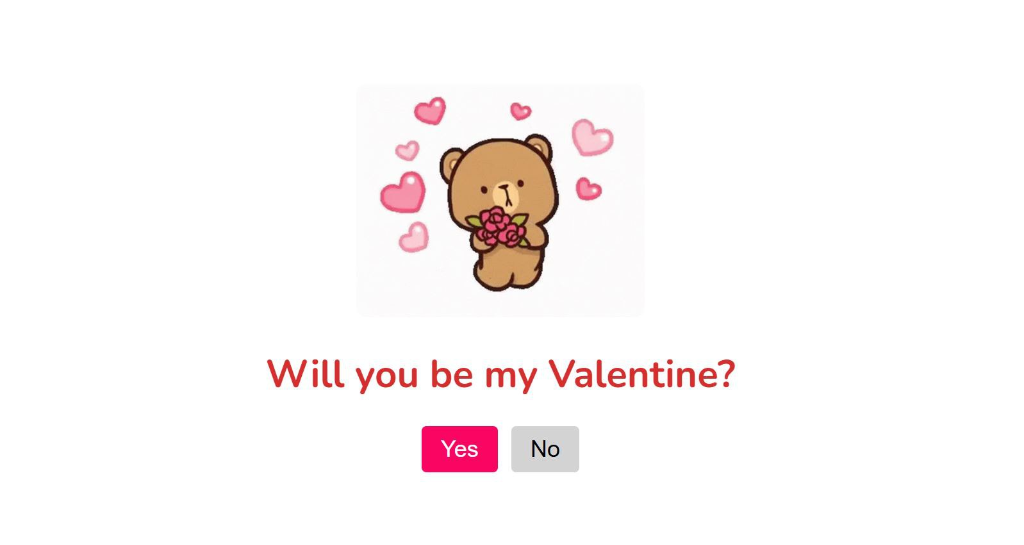
This Valentine's Day project creates an interactive card that asks the special question: "Will you be my Valentine?" The page features a cute animated bear with roses, two interactive buttons (Yes and No), and clever JavaScript that makes it increasingly difficult to say no!
The design uses a clean white background with pink accents, the Nunito font for a friendly feel, and interactive buttons that respond to user clicks. The "No" button cycles through 10 persuasive messages, while the "Yes" button grows bigger each time, making it the obvious choice!
Scroll down to the bottom of this page to get the complete project from our GitHub repository with all source code and assets!
⬇️ GitHub link available after Project Assets section
Below is the complete HTML structure for the "Will You Be My Valentine?" card.
Copy this entire code into your index.html file.
<!DOCTYPE html>
<html lang="en">
<head>
    <meta charset="UTF-8">
    <meta name="viewport" content="width=device-width, initial-scale=1.0">
    <title>Will You Be My Valentine?</title>
    <link rel="stylesheet" href="styles.css">
</head>
<body>
    <div class="container">
        <div class="gif_container">
            <img src="https://gifdb.com/images/high/cute-love-bear-roses-ou7zho5oosxnpo6k.gif" alt="Cute GIF">
        </div>
        <h1>Will you be my Valentine?</h1>
        <div class="buttons">
            <button class="yes-button" onclick="handleYesClick()">Yes</button>
            <button class="no-button" onclick="handleNoClick()">No</button>
        </div>
    </div>
    <script src="script.js"></script>
</body>
</html>
Below is the complete CSS styling for the Valentine's card.
Copy this entire code into your styles.css file.
@import url('https://fonts.googleapis.com/css2?family=Nunito:ital,wght@0,200..1000;1,200..1000&family=Poppins:ital,wght@0,100;0,200;0,300;0,400;0,500;0,600;0,700;0,800;0,900;1,100;1,200;1,300;1,400;1,500;1,600;1,700;1,800;1,900&display=swap');

body {
    display: flex;
    justify-content: center;
    align-items: center;
    height: 100vh;
    margin: 0;
    background-color: white;
    font-family: "Nunito", sans-serif;
    flex-direction: column;
}

.container {
    text-align: center;
}

h1 {
    font-size: 2.5em;
    color: #d32f2f;
}

.buttons {
    margin-top: 20px;
}

.yes-button {
    font-size: 1.5em;
    padding: 10px 20px;
    margin-right: 10px;
    background-color: #fa0561;
    color: white;
    border: none;
    border-radius: 5px;
    cursor: pointer;
}

.yes-button:hover {
    background-color: #e03777;
}

.no-button {
    font-size: 1.5em;
    padding: 10px 20px;
    background-color: #d3d3d3;
    color: black;
    border: none;
    border-radius: 5px;
    cursor: pointer;
}

.gif_container img {
    width: 300px;
    height: auto;
    border-radius: 10px;
    margin-top: 20px;
}
Below is the complete JavaScript code for the interactive functionality.
Copy this entire code into your script.js file.
const messages = [
    "Are you sure?",
    "Really sure??",
    "Are you positive?",
    "Pookie please...",
    "Just think about it!",
    "If you say no, I will be really sad...",
    "I will be very sad...",
    "I will be very very very sad...",
    "Ok fine, I will stop asking...",
    "Just kidding, say yes please! ❤️"
];

let messageIndex = 0;

function handleNoClick() {
    const noButton = document.querySelector('.no-button');
    const yesButton = document.querySelector('.yes-button');
    noButton.textContent = messages[messageIndex];
    messageIndex = (messageIndex + 1) % messages.length;
    const currentSize = parseFloat(window.getComputedStyle(yesButton).fontSize);
    yesButton.style.fontSize = `${currentSize * 1.5}px`;
}

function handleYesClick() {
    window.location.href = "yes_page.html";
}
When the user clicks "Yes", they're redirected to a celebration page with a cute kissing bear GIF and a sweet message.
<!DOCTYPE html>
<html lang="en">
<head>
    <meta charset="UTF-8">
    <meta name="viewport" content="width=device-width, initial-scale=1.0">
    <title>Knew you would say yes!</title>
    <link rel="stylesheet" href="./yes_style.css">
</head>
<body>
    <div class="container">
        <h1 class="header_text">Knew you would say yes!</h1>
        <div class="gif_container">
            <img src="https://media.tenor.com/gUiu1zyxfzYAAAAi/bear-kiss-bear-kisses.gif">
        </div>
    </div>
</body>
</html>
@import url('https://fonts.googleapis.com/css2?family=Nunito:ital,wght@0,200..1000;1,200..1000&family=Poppins:ital,wght@0,100;0,200;0,300;0,400;0,500;0,600;0,700;0,800;0,900;1,100;1,200;1,300;1,400;1,500;1,600;1,700;1,800;1,900&display=swap');

body {
    display: flex;
    justify-content: center;
    align-items: center;
    height: 100vh;
    margin: 0;
    background-color: white;
    font-family: "Nunito", sans-serif;
}

.container {
    text-align: center;
}

.header_text {
    font-size: 3em;
    color: #d32f2f;
}

.gif_container img {
    width: 300px;
    max-width: 500px;
    height: auto;
}
This project includes GIF images and other assets. Here's where to place them:
pages/
├── assets/
│   └── valentine-project/
│       ├── bear.gif           ← Your cute bear GIF
│       ├── hearts.gif         ← Animated hearts GIF
│       ├── preview.png        ← Preview screenshot
│       └── (other images)
│
└── downloads/
    └── valentine-project.zip  ← Complete project ZIP
To add your GIF images:
pages/assets/valentine-project/<img src="assets/valentine-project/bear.gif">preview.pngpages/downloads/Visit our GitHub repository to download all files including HTML, CSS, JavaScript, and GIF images. You can download the ZIP file directly from GitHub.
Download ZIP FileMake this Valentine's card your own:
It runs away from the cursor — making 'Yes' the only practical option.
Yes — it's pure static HTML/CSS/JS, drop into any free static host.
Tested on iOS Safari — works fine. Hover-based dodging falls back to a tap-to-move on touch.